Now Reading: GTA 6 Crashing on PS5 and Xbox? How to Fix Error CE-108255-1
- 01
GTA 6 Crashing on PS5 and Xbox? How to Fix Error CE-108255-1

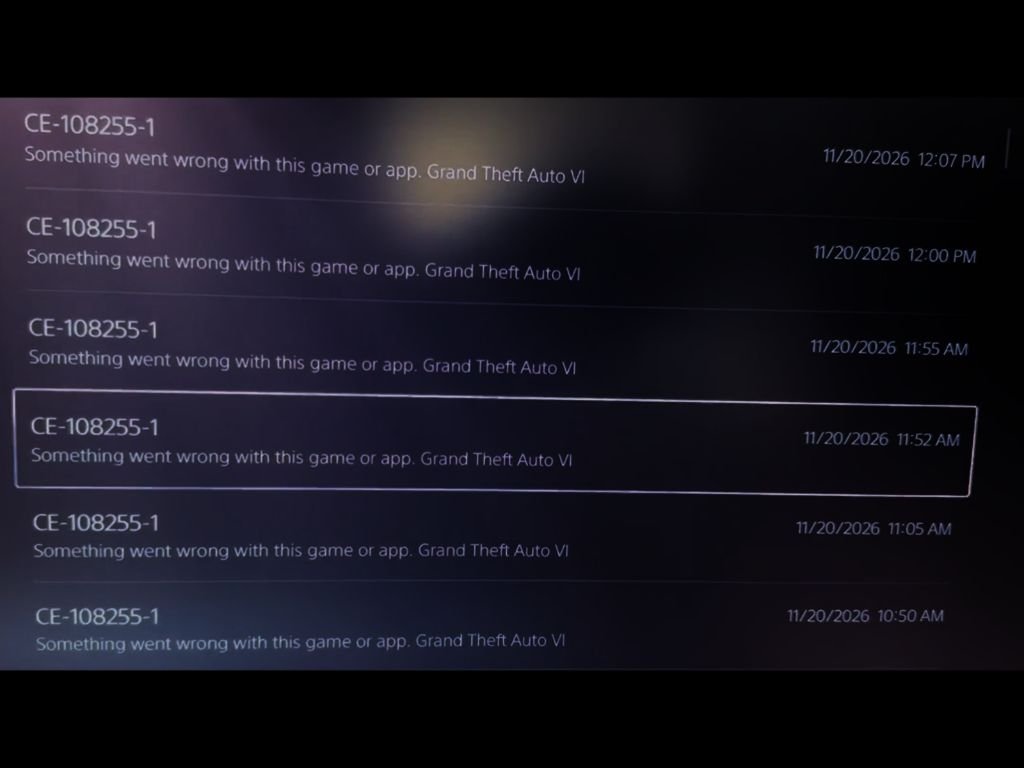
Is GTA 6 crashing on your PS5 or Xbox? You are not alone. Since launch on November 19, 2026, PS5, PS5 Slim and PS5 Pro owners have reported GTA 6 closing to the home screen with error CE-108255-1, and some Xbox Series X players report crashes too. As of November 22, Rockstar has not confirmed a cause or released a fix. Nothing below is guaranteed to cure it, but these steps remove the most common causes of console crashes, in the order worth trying.
GTA 6 Crash Status Right Now
| Question | Answer |
|---|---|
| Which consoles are affected? | PS5, PS5 Slim and PS5 Pro (error CE-108255-1), plus reports on Xbox Series X |
| When does it crash? | At start up or early in the game, for some players during the same early mission every time |
| Has Rockstar fixed it? | Not yet. No patch or known issue notice for the crashes so far |
| Is it your internet? | No. A crash to the home screen is a game or console problem, not a connection problem |
| Updates so far | Two game updates before launch (November 13 and 16), plus a required PS5 system update on November 17 |
If GTA 6 will not start because it cannot reach PlayStation Network or Xbox network, that is a different problem. Check our live GTA 6 server status page and PSN status first.
What Does Error CE-108255-1 Mean?
CE-108255-1 is not a GTA 6 code. It is Sony’s general PS5 code for an error occurred with the game or application, which means the game closed unexpectedly. Sony’s first advice for it is to update the game. Because the same code appears for any game crash, it does not tell you whether the cause is a bug in GTA 6, a corrupted file or something on your console, which is why the fixes below start with the simple ones.
| PS5 error | What it means | First thing to try |
|---|---|---|
| CE-108255-1 | The game crashed | Update GTA 6 and the PS5 system software |
| CE-100095-5 | The game could not start | Restart the PS5, then reinstall if it keeps happening |
| CE-100028-1 | Not enough free storage | Delete or move other games |
| CE-109245-1 | Your licence could not be confirmed | Restore Licences in Settings |
How to Fix GTA 6 Crashing on PS5
- Update GTA 6. Highlight GTA 6 on the home screen, press Options and choose Check for Update. Install anything waiting.
- Update the PS5 system software. PlayStation Support said system software 26.07-14.23.00, released on November 17, must be installed before GTA 6 can be played. Go to Settings › System › System Software.
- Restart fully. Turn the PS5 off completely, not Rest Mode, wait 30 seconds and start it again.
- Free up storage. GTA 6 needs about 212 GB plus room for updates. A nearly full drive can cause crashes and failed installs.
- Let it breathe. Keep the console in an open space with clear vents. Long GTA 6 sessions work the console hard, and overheating can close games.
- Clear Cache and Rebuild Database. Turn the PS5 off, hold the power button until the second beep to enter Safe Mode, connect the controller with a cable and choose Clear Cache and Rebuild Database. Your saved games are not deleted.
- Restore Licences in Settings › Users and Accounts › Other if GTA 6 crashes right at start up.
- Reinstall as a last resort. Delete GTA 6 and download it again. It is a very large download, so check how long it will take with our GTA 6 download time calculator first.
How to Fix GTA 6 Crashing on Xbox Series X|S
- Check for updates. Go to My games & apps › Manage › Updates and install any GTA 6 update, then check Settings › System › Updates for console updates.
- Power cycle the console. Hold the power button for 10 seconds until it turns off, unplug it for a minute, then turn it back on. This clears the system cache.
- Free up storage so the game and its updates have room to install.
- Keep the console cool with space around it and clear vents.
- Check the install. If one area always crashes, uninstall and reinstall GTA 6. Your saves are kept in the cloud.
- Try a different power mode. If crashes happen after waking from sleep, fully restart the console before you play.
Is GTA 6 Crashing Because of the Servers?
Almost certainly not. GTA 6 launched as a single player game, so a crash during play is caused by the game or the console, not by Rockstar’s servers or your internet speed. Your connection only matters for downloads, updates, signing in and checking your licence on the first launch.
One exception: if GTA 6 shows a sign in or licence error rather than crashing, PSN or Xbox network may be having problems. PlayStation Network had outages on November 18 and on launch morning, November 19. Check our PSN status and GTA 6 server status pages to see if a platform is down.
Will Rockstar Fix the GTA 6 Crashes?
Rockstar usually fixes launch crashes with title updates in the first weeks, as it did after previous launches. So far it has released two game updates before launch, on November 13 and November 16, without publishing patch notes, and its support article for GTA 6 errors links to Sony’s and Microsoft’s error pages. Keep automatic updates turned on so you get the fix as soon as it arrives.
How to report a crash to Rockstar
- Note the error code, the mission or place where it crashed, and your console model.
- Write down what you were doing, for example driving, a cutscene or a gunfight.
- Contact Rockstar Support from the Rockstar Games website and include those details.
- On PS5, also send the crash report when the console asks, which helps Sony and Rockstar find the cause.
What to Do While You Wait for a Patch
- Turn on automatic updates so the fix installs as soon as Rockstar releases it: on PS5 in Settings › Saved Data and Game/App Settings › Automatic Updates, on Xbox in Settings › System › Updates.
- Play shorter sessions and give the console a break between them, which helps if heat plays a part.
- Save often wherever the game lets you, so a crash costs you minutes rather than an hour.
- Skip the problem spot for now if the game always crashes in the same place, and do other activities until a patch arrives.
- Check back here: this page is updated when Rockstar or Sony confirms a fix.
Crashes, Low FPS or Lag?
These three problems are often mixed up. A crash closes the game. Low FPS makes the game stutter or feel slow, and GTA 6 targets 30 FPS on every console, so short drops in busy scenes are normal; see our GTA 6 FPS and performance guide. Lag comes from your internet and only matters when you stream or play online, so test it with our internet speed test for online gaming or WiFi speed test. If your problem is a download that will not finish, use our GTA 6 download problem fixer.
This page is updated as Rockstar and Sony respond. Game Server Ping is not affiliated with Rockstar Games, Sony or Microsoft.
GTA 6 Crashing FAQ
Why does GTA 6 keep crashing on PS5?
Many PS5, PS5 Slim and PS5 Pro owners report GTA 6 crashing with error CE-108255-1 since launch. Rockstar has not confirmed a cause or fix yet. Update the game and system software, restart fully, free storage and rebuild the database in Safe Mode.
What does CE-108255-1 mean on PS5?
CE-108255-1 is Sony’s general code for an error with the game or application, which means the game closed unexpectedly. It is not specific to GTA 6, and Sony’s first advice is to update the game.
Is there a fix for GTA 6 error CE-108255-1?
No official fix has been released yet. Updating GTA 6 and the PS5 system software, a full restart, freeing storage and rebuilding the database help with many crashes until Rockstar releases a patch.
Is GTA 6 crashing on Xbox too?
Yes, some Xbox Series X players report crashes. Rockstar has not published a cause or fix for Xbox either. Install all updates, power cycle the console and keep it cool.
Will rebuilding the database delete my GTA 6 save?
No. Clear Cache and Rebuild Database in PS5 Safe Mode reorganises the drive and clears temporary files, but it does not delete games or saved data.
Is GTA 6 crashing because of the servers?
No. GTA 6 is single player at launch, so crashes during play come from the game or console. Only sign in and licence errors can be caused by PSN or Xbox network problems.
Do I need a PS5 system update to play GTA 6?
Yes. PlayStation Support said system software 26.07-14.23.00, released on November 17, 2026, must be installed before GTA 6 can be played.
Should I reinstall GTA 6 to stop crashes?
Only as a last resort. GTA 6 is about 212 GB, so try updates, a full restart, freeing storage and rebuilding the database first.
Previous Post
Next Post